Wishes and wish films
Wishes are the heart of the Well Wishes Book. Guests draw something, write a few lines, add a voice note if they like, and the best ones come alive on the big screen.
How a guest leaves a wish#
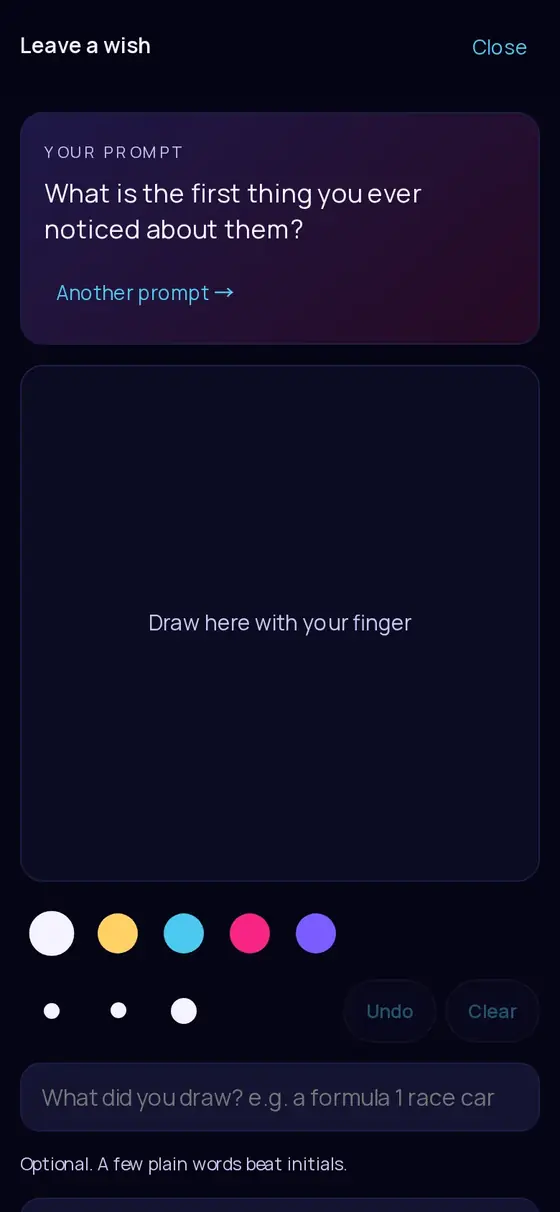
- Open the studioFrom the Wish tab in the camera, the wish card in Your shots, or the card shown when shots run out.
- DrawA prompt suggests what to draw, with Another prompt → to shuffle. Five ink colours, three nib sizes (Pen, Marker, Brush), Undo and Clear.
- Say what it isWhat did you draw? A few plain words, like "a red sports car", help the AI character come out right.
- WriteAnd in your own words… up to 600 characters.
- Add a voice note (optional)Where you have voice notes on: 10 seconds on Spark, 20 seconds on paid plans.
- Sign it (optional)A signature pad; the signature is printed under the wish in the book.
- Send my wishThe wish goes to your review queue.
A wish needs a drawing or some words. Each guest can send 1 wish on Spark and 3 on paid plans. Wishes need a connection to send; unlike photos they are not queued offline.
Drawing or character#
After sending, the guest sees Which one goes on the big screen? with two cards: Your drawing and Your character ✨, an AI illustration made from the sketch in about half a minute. The character is chosen by default; the guest taps Done to confirm. Both are kept for you either way. If a character cannot be made, the drawing is used.
The wish film#
Guests can pay to turn their wish into a short animated film that plays on the big screen and lives in your book forever. It is the guest's own purchase: you never pay for it.
- Price: S$3.00 in Singapore, US$2.50 elsewhere, paid by card through Stripe, with an emailed receipt.
- The guest chooses what to animate (the drawing or the character) and what it should do: Just bring it to life, Wave hello, Dance, Blow a kiss, Jump for joy, Clap and cheer, Spin around, Celebrate, or Something else in their own words (checked before payment).
- The film is a short clip of about four seconds, without sound, and is ready in about a minute.
- When it is ready the guest chooses Yes, show it or Keep it to myself. If they walk away it goes up after about five minutes, and always only after your approval if you review wishes.
The guest sees that it did not come out and that nothing is lost. Refunds for failed films are handled by the AINE team: email support@aine.cam with the event code.
Approving wishes#
Wishes arrive in the Album tab under Wishes, and in the Live tab's approvals queue. By default every wish waits for you or a volunteer before it reaches the wall. For each wish you can:
- Approve it for the wall, Hide it (kept in your list, off the wall), or Delete then Delete for good.
- Pin it so it features.
- Reply in the book: up to 400 characters, printed under the wish and sent to that guest's keepsake.
Other controls: Let guests leave wishes (on or off), Auto-approve wishes: straight to the big screen (when your event offers it), and Hide all wishes. Wishes flagged by the automatic language or drawing check are held for review even when auto-approve is on.
Drawings and photos are screened automatically. Generated wish films are not, so keep wish review on if the audience is sensitive (for example corporate or family events).
Showing wishes on the wall#
Approved wishes appear in the wall's rotation: in Spotlight every fifth slide is a wish, and in Duo, Trio and Grid a tile is sometimes a wish (Mosaic shows photos only). On the Live tab, Wish reveal buttons put a single wish full-screen for 25 seconds, the drawing beside its animated version.
The couple's page#
In Album › The couple's page tap Write it to add a dedication (up to 1,200 characters) and sign-off that open the Well Wishes Book. The Well Wishes Book.
Still stuck? A person answers every email, usually within one working day.
Email support@aine.cam