Set up your event
QR codes and the print pack
Your event has one QR code for everything. The print pack turns it into ready-to-cut table cards and signs.
Open the print pack#
- Go to BeforeFind The one QR card and tap Print pack.
- Set the number of tablesUse the Tables box (1 to 60). Each card is numbered.
- Choose languagesIf you offer more than one join language, tick All languages to print "Scan to shoot" in each.
- PrintTap Print and print on A4, or save as PDF to send to your printer.
What is in the pack#
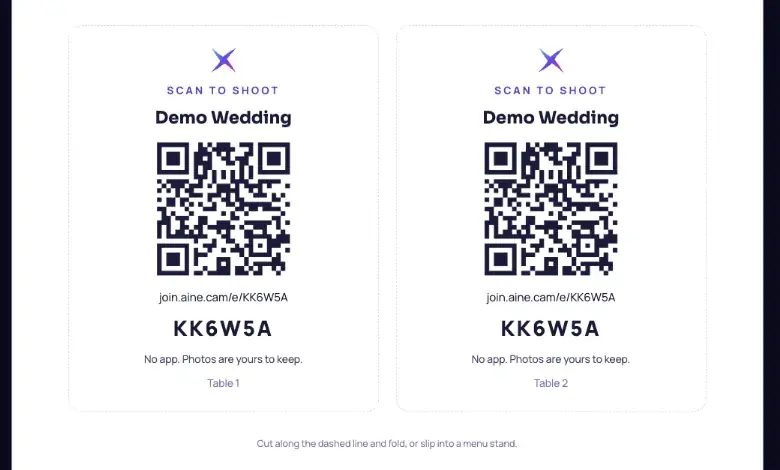
- Table tent cards, two per A4 page, with your logo, "Scan to shoot", event name, QR code, link, six-letter code and table number.
- A door sign on A4 for the entrance or registration table.
- A night-of checklist split into before doors, during and after.
- MC scripts printed from the MC lines in your run sheet.
Opening the print pack ticks Print the table cards on your readiness checklist.
Other ways to share the QR#
- QR as PNG on the Before tab, for invitations, slides, menus or banners.
- Copy link, to paste into a WhatsApp group or an email to guests before the day.
- The live wall shows a Scan to shoot QR in its corner all night, and the Scan to join cue fills the screen with it. The portrait door signage mode turns any vertical screen into a giant QR. See The live wall.
Placement that works
One card per table at eye level, one sign at the entrance, and the wall's scan cue right after the first toast. That combination gets most rooms shooting within minutes.
Still stuck? A person answers every email, usually within one working day.
Email support@aine.cam